
Python 条件语句是通过一条或多条语句的执行结果(True 或者 False)来决定执行的代码块。
可以通过下图来简单了解条件语句的执行过程:
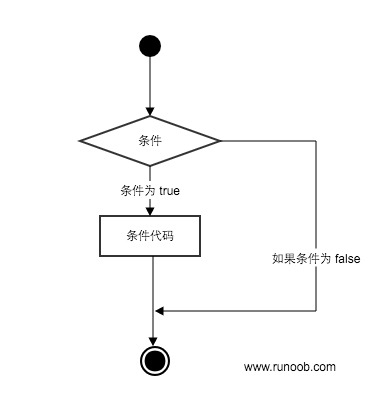
代码执行过程:
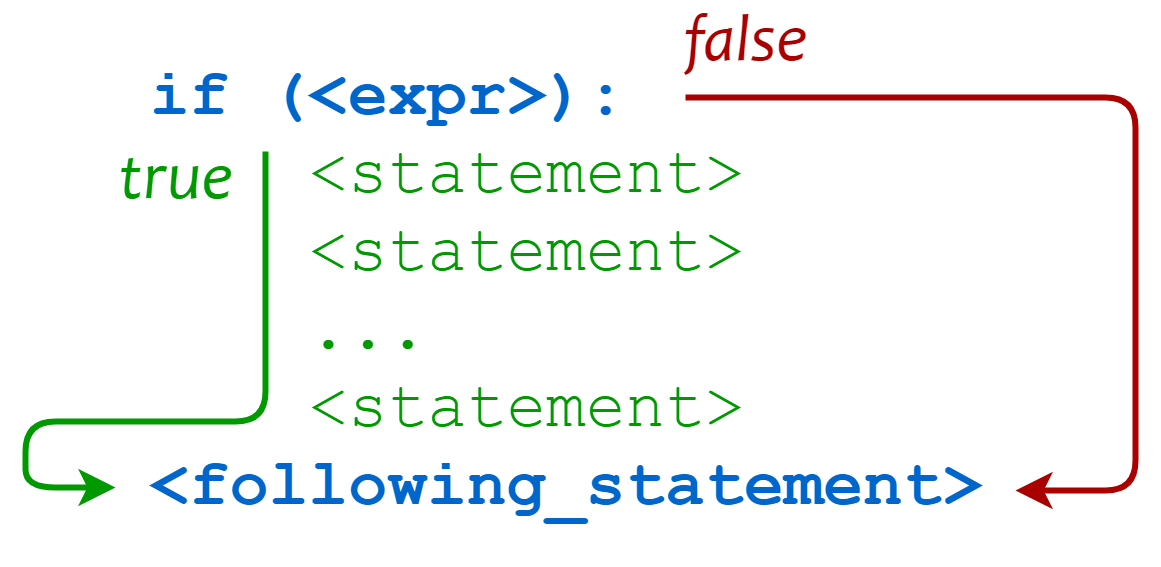
条件控制
条件判断关键字
| 关键字 / 函数 | 说明 | 示例 |
|---|---|---|
if | 条件判断语句,当条件为 True 时执行代码块 | if x > 0: |
elif | 多条件判断分支(else if) | elif x == 0: |
else | 所有条件不满足时执行 | else: |
pass | 空语句,占位用,保证语法完整 | if x > 0: pass |
match | 结构化模式匹配(Python 3.10+,类似 switch) | match x: case 1: ... |
if 语句
Python中if语句的一般形式如下所示:
if condition_1: statement_block_1 elif condition_2: statement_block_2 else: statement_block_3
- 如果 "condition_1" 为 True 将执行 "statement_block_1" 块语句
- 如果 "condition_1" 为False,将判断 "condition_2"
- 如果"condition_2" 为 True 将执行 "statement_block_2" 块语句
- 如果 "condition_2" 为False,将执行"statement_block_3"块语句
Python 中用 elif 代替了 else if ,所以if语句的关键字为: if – elif – else 。
注意:
- 1、每个条件后面要使用冒号:,表示接下来是满足条件后要执行的语句块。
- 2、使用缩进来划分语句块,相同缩进数的语句在一起组成一个语句块。
- 3、在 Python 中没有 switch...case 语句,但在 Python3.10 版本添加了 match...case,功能也类似,详见下文。
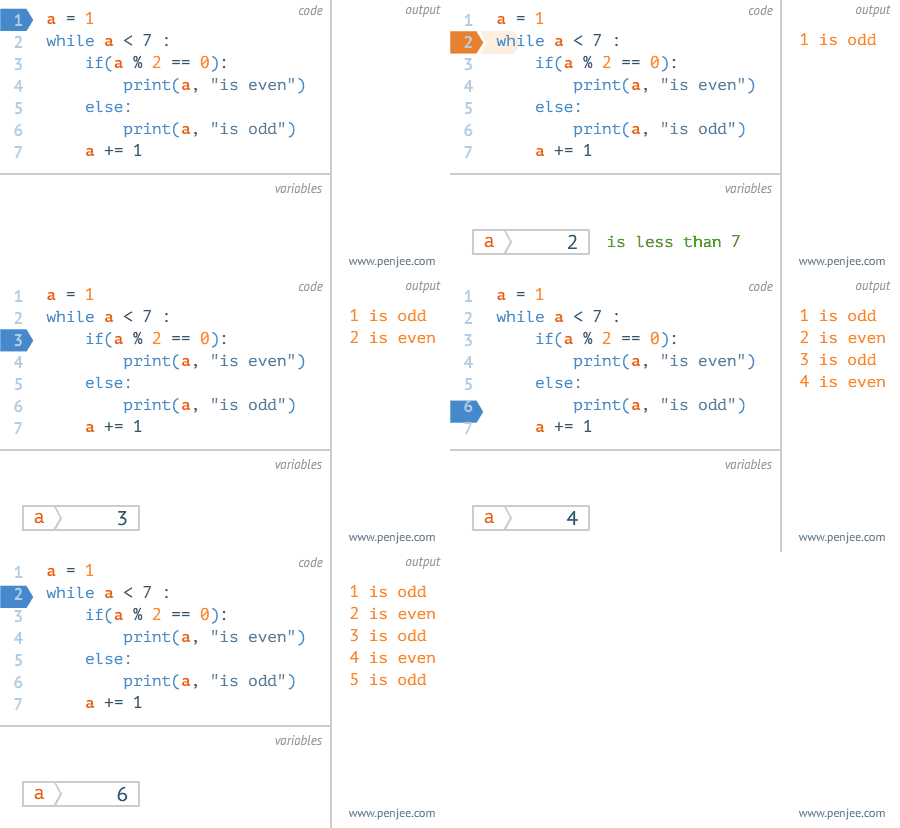
Gif 演示:
实例
以下是一个简单的 if 实例:
实例
var1 = 100
if var1:
    print("1 - if 表达式条件为 true")
    print(var1)

var2 = 0
if var2:
    print("2 - if 表达式条件为 true")
    print(var2)

print("Good bye!")
执行以上代码,输出结果为:
1 - if 表达式条件为 true
100
Good bye!
从结果可以看到由于变量 var2 为 0,所以对应的 if 内的语句没有执行。
以下实例演示了狗的年龄计算判断:
实例
age = int(input("请输入你家狗狗的年龄: "))
print("")

if age <= 0:
    print("你是在逗我吧!")
elif age == 1:
    print("相当于 14 岁的人。")
elif age == 2:
    print("相当于 22 岁的人。")
elif age > 2:
    human = 22 + (age - 2) * 5
    print("对应人类年龄: ", human)

input("点击 enter 键退出")
将以上脚本保存在dog.py文件中,并执行该脚本:
$ python3 dog.py
请输入你家狗狗的年龄: 1

相当于 14 岁的人。
点击 enter 键退出
以下为if中常用的操作运算符:
| 操作符 | 描述 |
|---|---|
< | 小于 |
<= | 小于或等于 |
> | 大于 |
>= | 大于或等于 |
== | 等于,比较两个值是否相等 |
!= | 不等于 |
实例
print(5 == 6)
x = 5
y = 8
print(x == y)
以上实例输出结果:
False
False
high_low.py文件演示了数字的比较运算:
实例
number = 7
guess = -1
print("数字猜谜游戏!")
while guess != number:
    guess = int(input("请输入你猜的数字:"))
    if guess == number:
        print("恭喜,你猜对了!")
    elif guess < number:
        print("猜的数字小了...")
    elif guess > number:
        print("猜的数字大了...")
执行以上脚本,实例输出结果如下:
$ python3 high_low.py
数字猜谜游戏!
请输入你猜的数字:1
猜的数字小了...
请输入你猜的数字:9
猜的数字大了...
请输入你猜的数字:7
恭喜,你猜对了!
if 嵌套
在嵌套 if 语句中,可以把 if...elif...else 结构放在另外一个 if...elif...else 结构中。
if 表达式1:
    语句
    if 表达式2:
        语句
    elif 表达式3:
        语句
    else:
        语句
elif 表达式4:
    语句
else:
    语句
实例
num = int(input("输入一个数字:"))
if num % 2 == 0:
    if num % 3 == 0:
        print("你输入的数字可以整除 2 和 3")
    else:
        print("你输入的数字可以整除 2,但不能整除 3")
else:
    if num % 3 == 0:
        print("你输入的数字可以整除 3,但不能整除 2")
    else:
        print("你输入的数字不能整除 2 和 3")
将以上程序保存到 test_if.py 文件中,执行后输出结果为:
$ python3 test.py
输入一个数字:6
你输入的数字可以整除 2 和 3
match...case
Python 3.10 增加了 match...case 的条件判断,不需要再使用一连串的 if-else 来判断了。
match 后的对象会依次与 case 后的内容进行匹配,如果匹配成功,则执行匹配到的表达式,否则直接跳过,_ 可以匹配一切。
<svg width="600" height="340" viewBox="0 0 600 340" xmlns="http://www.w3.org/2000/svg" font-family="monospace, sans-serif" font-size="13"><defs><marker id="arrow" markerWidth="8" markerHeight="8" refX="6" refY="3" orient="auto"><path d="M0,0 L0,6 L8,3 z" fill="#555"></path></marker></defs><rect x="220" y="10" width="160" height="38" rx="19" fill="#4a90d9" stroke="#2c6fad" stroke-width="1.5"></rect><text x="300" y="34" text-anchor="middle" fill="white" font-weight="bold">match subject</text> <line x1="300" y1="48" x2="300" y2="76" stroke="#555" stroke-width="1.5" marker-end="url(#arrow)"></line><rect x="190" y="76" width="220" height="36" rx="6" fill="#f0f4ff" stroke="#aab8e8" stroke-width="1.5"></rect><text x="300" y="99" text-anchor="middle" fill="#333">case <pattern_1>?</text> <line x1="410" y1="94" x2="480" y2="94" stroke="#04aa6d" stroke-width="1.5" marker-end="url(#arrow)"></line><text x="444" y="88" text-anchor="middle" fill="#04aa6d" font-size="11">匹配</text> <rect x="480" y="76" width="100" height="36" rx="6" fill="#e6fff2" stroke="#04aa6d" stroke-width="1.5"></rect><text x="530" y="99" text-anchor="middle" fill="#04aa6d">action_1</text> <line x1="300" y1="112" x2="300" y2="140" stroke="#555" stroke-width="1.5" marker-end="url(#arrow)"></line><text x="313" y="131" fill="#e74c3c" font-size="11">不匹配</text> <rect x="190" y="140" width="220" height="36" rx="6" fill="#f0f4ff" stroke="#aab8e8" stroke-width="1.5"></rect><text x="300" y="163" text-anchor="middle" fill="#333">case <pattern_2>?</text> <line x1="410" y1="158" x2="480" y2="158" stroke="#04aa6d" stroke-width="1.5" marker-end="url(#arrow)"></line><text x="444" y="152" text-anchor="middle" fill="#04aa6d" font-size="11">匹配</text> <rect x="480" y="140" width="100" height="36" rx="6" fill="#e6fff2" stroke="#04aa6d" stroke-width="1.5"></rect><text x="530" y="163" text-anchor="middle" fill="#04aa6d">action_2</text> <line x1="300" y1="176" x2="300" y2="204" stroke="#555" stroke-width="1.5" marker-end="url(#arrow)"></line><text x="313" y="195" fill="#e74c3c" font-size="11">不匹配</text> <rect x="190" y="204" width="220" height="36" rx="6" fill="#f0f4ff" stroke="#aab8e8" stroke-width="1.5"></rect><text x="300" y="227" text-anchor="middle" fill="#333">case <pattern_3>?</text> <line x1="410" y1="222" x2="480" y2="222" stroke="#04aa6d" stroke-width="1.5" marker-end="url(#arrow)"></line><text x="444" y="216" text-anchor="middle" fill="#04aa6d" font-size="11">匹配</text> <rect x="480" y="204" width="100" height="36" rx="6" fill="#e6fff2" stroke="#04aa6d" stroke-width="1.5"></rect><text x="530" y="227" text-anchor="middle" fill="#04aa6d">action_3</text> <line x1="300" y1="240" x2="300" y2="268" stroke="#555" stroke-width="1.5" marker-end="url(#arrow)"></line><text x="313" y="260" fill="#e74c3c" font-size="11">不匹配</text> <rect x="190" y="268" width="220" height="36" rx="6" fill="#fff8e6" stroke="#f0a500" stroke-width="1.5"></rect><text x="300" y="291" text-anchor="middle" fill="#b07d00">case _(通配符)</text> <line x1="410" y1="286" x2="480" y2="286" stroke="#f0a500" stroke-width="1.5" marker-end="url(#arrow)"></line><text x="444" y="280" text-anchor="middle" fill="#f0a500" font-size="11">必匹配</text> <rect x="480" y="268" width="100" height="36" rx="6" fill="#fff3cd" stroke="#f0a500" stroke-width="1.5"></rect><text x="530" y="291" text-anchor="middle" fill="#b07d00">wildcard</text></svg>
语法格式如下:
match subject:
    case <pattern_1>:
        <action_1>
    case <pattern_2>:
        <action_2>
    case <pattern_3>:
        <action_3>
    case _:
        <action_wildcard>
case _: 类似于 C 和 Java 中的 default:,当其他 case 都无法匹配时,匹配这条,保证永远会匹配成功。
实例
def http_error(status):
    match status:
        case 400:
            return "Bad request"
        case 404:
            return "Not found"
        case 418:
            return "I'm a teapot"
        case _:
            return "Something's wrong with the internet"

print(http_error(400))
print(http_error(404))
print(http_error(418))
print(http_error(500))
以上是一个输出 HTTP 状态码的实例,多个状态码的输出结果为:
Bad request
Not found
I'm a teapot
Something's wrong with the internet
一个 case 也可以设置多个匹配条件,条件使用 | 隔开,例如:
...
    case 401|403|404:
        return "Not allowed"
<svg width="540" height="130" viewBox="0 0 540 130" xmlns="http://www.w3.org/2000/svg" font-family="monospace" font-size="13"><defs><marker id="arr2" markerWidth="8" markerHeight="8" refX="6" refY="3" orient="auto"><path d="M0,0 L0,6 L8,3 z" fill="#555"></path></marker></defs><rect x="10" y="44" width="100" height="36" rx="18" fill="#4a90d9" stroke="#2c6fad" stroke-width="1.5"></rect><text x="60" y="67" text-anchor="middle" fill="white" font-weight="bold">status</text> <line x1="110" y1="54" x2="178" y2="28" stroke="#aaa" stroke-width="1.2" marker-end="url(#arr2)"></line><line x1="110" y1="62" x2="178" y2="62" stroke="#aaa" stroke-width="1.2" marker-end="url(#arr2)"></line><line x1="110" y1="70" x2="178" y2="96" stroke="#aaa" stroke-width="1.2" marker-end="url(#arr2)"></line><rect x="178" y="10" width="58" height="32" rx="6" fill="#f0f4ff" stroke="#aab8e8" stroke-width="1.5"></rect><text x="207" y="31" text-anchor="middle" fill="#333">401</text> <rect x="178" y="46" width="58" height="32" rx="6" fill="#f0f4ff" stroke="#aab8e8" stroke-width="1.5"></rect><text x="207" y="67" text-anchor="middle" fill="#333">403</text> <rect x="178" y="82" width="58" height="32" rx="6" fill="#f0f4ff" stroke="#aab8e8" stroke-width="1.5"></rect><text x="207" y="103" text-anchor="middle" fill="#333">404</text> <text x="246" y="33" fill="#e67e22" font-size="20" font-weight="bold">|</text> <text x="246" y="69" fill="#e67e22" font-size="20" font-weight="bold">|</text> <line x1="238" y1="26" x2="305" y2="62" stroke="#04aa6d" stroke-width="1.2" marker-end="url(#arr2)"></line><line x1="238" y1="62" x2="305" y2="62" stroke="#04aa6d" stroke-width="1.2" marker-end="url(#arr2)"></line><line x1="238" y1="98" x2="305" y2="62" stroke="#04aa6d" stroke-width="1.2" marker-end="url(#arr2)"></line><rect x="305" y="44" width="220" height="36" rx="6" fill="#e6fff2" stroke="#04aa6d" stroke-width="1.5"></rect><text x="415" y="67" text-anchor="middle" fill="#04aa6d">"Not allowed"</text></svg>
实例
def check_permission(status):
    match status:
        case 200:
            return "OK - 请求成功"
        case 301 | 302:
            return "Redirect - 重定向"
        case 401 | 403 | 404:
            return "Not allowed - 无权限或未找到"
        case 500 | 502 | 503:
            return "Server Error - 服务器错误"
        case _:
            return "Unknown status - 未知状态码"

for code in [200, 301, 403, 500, 418]:
    print(f"状态码 {code}: {check_permission(code)}")
match...case 更多内容参考: Python match-case 语句
相关
练习题
一、知识回顾(读完直接做下面的实践题)
- 三种分支关键字:
if 条件:、elif 条件:、else:——Python 用elif代替else if,中间可以写多个elif - 语法要点:条件后面必须写冒号,代码块靠缩进划分,同一分支里的语句缩进要对齐
- 条件真假的判断:非 0 数字、非空字符串/列表都是真,
0、""、[]、None都是假——所以if var1:可以直接拿来判断"有没有值" - 常用比较运算符:
<、<=、>、>=、==(判断相等,别写成=)、!=(不相等) - 多分支从上往下依次判断,命中一个就跳出:所以区间要写清楚范围(如
80 <= score < 90),否则把>= 80写在前面,大于 100 的分数也会落进这一档 elif都覆盖不到的情况用else兜底;分支里暂时没想好写什么,可以用pass占位,保证语法完整- 嵌套:if 里面可以再放 if...elif...else,内层要再往里缩进一级;外层先分大类,内层再细分
- 三元表达式:
值1 if 条件 else 值2——一行写完的简单二选一,条件成立取前面的值,否则取后面的值 match...case(Python 3.10+):match 变量:后面跟多个case 值:,从上往下匹配;case _:是通配符,兜住所有情况(相当于其它语言的 default)- 一个
case可以用|连接多个条件:case 301 | 302:,命中任意一个就走这个分支
二、裸写题
- 输入一个整数
num - 如果
num > 0,打印"正数" - 如果
num == 0,打印"零" - 如果
num < 0,打印"负数"
批改(2026-09-28):✅ 正确(实测输入 5 →
正数、0 →零、-3 →负数,三个分支都对)。- 提示(先自己想,实在想不出再点开)
一级 · 思路:三种情况互斥,从上往下依次判断;用一条判断+一条续判+一条兜底就能覆盖完 二级 · 方法:
if 条件:→elif 条件:→else:;读输入用int(input("提示语"))三级 · 骨架:if num ____ 0:/elif num == ____:/else:- 参考答案(做完再点开)
python# 2-1 num = int(input("请输入一个整数: ")) if num > 0: print("正数") elif num == 0: print("零") else: print("负数")- 输入一个整数
- 输入成绩
score(0-100) - 90-100:打印"优秀"
- 80-89:打印"良好"
- 70-79:打印"中等"
- 60-69:打印"及格"
- 0-59:打印"不及格"
- 其他:打印"成绩无效"
批改(2026-09-28):❌ 缺"其他:成绩无效"这一档:实测 105、120、150 都输出
良好(elif score >= 80把大于 100 的分也接住了)、-5 输出不及格,应输出成绩无效;0-100 以内的判断都对(95→优秀、85→良好、75→中等、65→及格、30→不及格)。正确写法是把条件写成区间,如elif 80 <= score < 90:、elif 0 <= score < 60:,最后else: print("成绩无效")。- 提示(先自己想,实在想不出再点开)
一级 · 思路:每一档都是一个"左闭右开"的区间(含下界、不含上界),最后一档用 else 兜住 0-100 之外的所有输入 二级 · 方法:多条
elif串联;链式比较90 <= score <= 100、80 <= score < 90三级 · 骨架:if ____ <= score <= 100:/elif 80 <= score < ____:/else:(兜底打印"成绩无效")- 参考答案(做完再点开)
python# 2-2 score = int(input("请输入成绩: ")) if 90 <= score <= 100: print("优秀") elif 80 <= score < 90: print("良好") elif 70 <= score < 80: print("中等") elif 60 <= score < 70: print("及格") elif 0 <= score < 60: print("不及格") else: print("成绩无效")- 输入成绩
- 输入一个整数
num - 先判断是否为偶数(
num % 2 == 0) - 如果是偶数,再判断是否能被 3 整除
- 如果是奇数,再判断是否能被 3 整除
批改(2026-09-28):✅ 正确(实测 6 →
是整数,而且能被三整除、4 →是整数,不能被三整除、9 →是奇数,能被3整除、5 →是奇数,不能被3整除,四组判断都对);偶数分支打印的"是整数"建议改成"是偶数"(这里判断的其实是奇偶)。- 提示(先自己想,实在想不出再点开)
一级 · 思路:先分"奇/偶"两条大路,每条路上再分"能不能被 3 整除",也就是两层判断套在一起 二级 · 方法:外层用
if num % 2 == 0:配else:;内层再写一层if num % 3 == 0:配else:(缩进再往右一级) 三级 · 骨架:if num % ____ == 0:/if num % 3 == ____:/else:/if num % 3 == 0:- 参考答案(做完再点开)
python# 2-3 num = int(input("请输入一个整数: ")) if num % 2 == 0: if num % 3 == 0: print(f"{num} 是偶数且能被3整除") else: print(f"{num} 是偶数但不能被3整除") else: if num % 3 == 0: print(f"{num} 是奇数且能被3整除") else: print(f"{num} 是奇数但不能被3整除")- 输入一个整数
- 输入一个整数
num - 用三元表达式判断奇偶(偶数得到"偶数",奇数得到"奇数")
- 打印结果
批改(2026-09-28):✅ 正确(实测 4 →
偶数、7 →奇数,"偶数" if num % 2 == 0 else "奇数"写法正确)。- 提示(先自己想,实在想不出再点开)
一级 · 思路:三元表达式就是把 if-else 压成一行:条件成立取第一个值,不成立取第二个值 二级 · 方法:
值1 if 条件 else 值2,即"偶数" if num % 2 == 0 else "奇数"三级 · 骨架:result = "偶数" ____ num % 2 == 0 ____ "奇数"- 参考答案(做完再点开)
python# 2-4 num = int(input("请输入一个整数: ")) result = "偶数" if num % 2 == 0 else "奇数" print(f"{num} 是{result}")- 输入一个整数
- 输入一个数字
day(1-7) - 用 match...case 判断是星期几
- 1-7 分别对应"星期一"到"星期日"
批改(2026-09-28):✅ 正确(实测 1 →
星期一、7 →星期日、8 →输入无效,case _兜底也写了)。- 提示(先自己想,实在想不出再点开)
一级 · 思路:match 后面写要判断的变量,每个 case 写一个可能的值;最后留一个"什么都接"的分支,处理 1-7 以外的输入 二级 · 方法:
match 变量:配case 值:;通配符case _:(相当于 default) 三级 · 骨架:match ____:/case 1:/case ____:(兜底打印"输入无效")- 参考答案(做完再点开)
python# 2-5 day = int(input("请输入数字(1-7): ")) match day: case 1: print("星期一") case 2: print("星期二") case 3: print("星期三") case 4: print("星期四") case 5: print("星期五") case 6: print("星期六") case 7: print("星期日") case _: print("输入无效")- 输入一个数字
- 输入 HTTP 状态码
status - 用 match...case 判断状态类型
- 200:成功
- 301 | 302:重定向
- 404:未找到
- 500 | 502 | 503:服务器错误
- 其他:未知
批改(2026-09-28):✅ 正确(实测 200 →
成功、301/302 →重定向、404 →未找到、500/503 →服务器错误、999 →未知状态码,多条件|写法正确;输入提示里的"状态吗"是"状态码"的笔误)。- 提示(先自己想,实在想不出再点开)
一级 · 思路:好几个状态码要归到同一档,就把它们写在同一个分支里;老规矩,最后留一个通配分支 二级 · 方法:同一个 case 里用
|连接多个值:case 301 | 302:、case 500 | 502 | 503:三级 · 骨架:case ____ | 302:/case 500 | 502 | ____:/case _:(兜底打印"未知状态码")- 参考答案(做完再点开)
python# 2-6 status = int(input("请输入状态码: ")) match status: case 200: print("成功") case 301 | 302: print("重定向") case 404: print("未找到") case 500 | 502 | 503: print("服务器错误") case _: print("未知状态码")- 输入 HTTP 状态码