
上一篇讲的是 Pydantic(功能最全、唯一会校验)。这一篇补齐另外三种 Schema 写法,并用一个假服务端实测它们遇到"字段不匹配"时到底会怎样。
模式2:TypedDict(轻量的字典结构)
TypedDict 是 Python 3.8+ 引入的类型提示工具——带有类型声明的字典结构,适合"快速定义字典结构、又不需要 Pydantic 那套重量级功能"的场景。
普通 dict 没有类型信息,看不出该有哪些字段:
{
    "title": "盗梦空间",
    "year": 2010,
    "director": "克里斯托弗·诺兰",
    "rating": 9.3
}
TypedDict 可以进一步说明:这个字典应该有哪些字段、每个字段是什么类型:
from typing_extensions import TypedDict
class MovieDict(TypedDict):
title: str
year: int
director: str
rating: float
movie: MovieDict = {
"title1": "盗梦空间", # ← 故意写错字段名
"year": 2010,
"director": "克里斯托弗·诺兰",
"rating": 8.8,
}
print(movie)
# {'title1': '盗梦空间', 'year': 2010, 'director': '克里斯托弗·诺兰', 'rating': 8.8}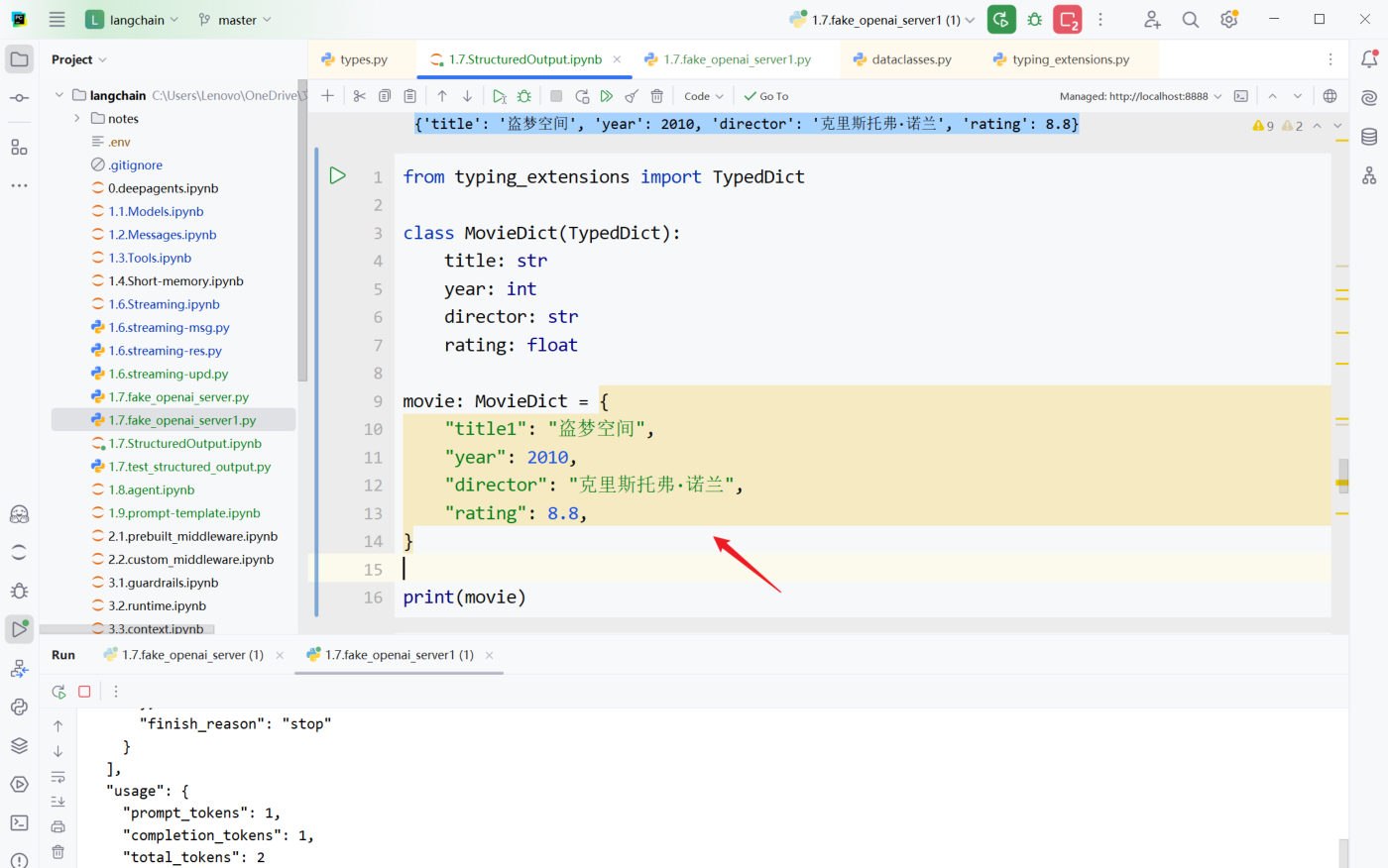 图:字段名故意写成 title1 的 TypedDict 示例(课程实测截图)
WARNING
TypedDict 主要是类型声明,不是运行时强校验器。 上面字段名 title 写成了 title1,只有 IDE 的静态类型检查会标记,运行起来照样输出——不会抛异常。
Annotated:给类型附加说明
Annotated 用来在"类型"之外再附加额外信息(即元数据),作用类似 Pydantic 的 Field:
Annotated[类型, 附加信息1, 附加信息2, ...]from typing_extensions import TypedDict, Annotated
class MovieDict(TypedDict):
"""电影的详细信息"""
title: Annotated[str, ..., "电影标题"]
year: Annotated[int, ..., "电影上映年份"]
director: Annotated[str, Ellipsis, "导演"]
rating: Annotated[float, "电影评分,满分十分"]... 是 Python 的字面量,等价于 Ellipsis,可以理解为占位符:下游框架(如 LangChain)能对它做定制化处理——在 LangChain 里 Annotated 的 ... 表示"该字段必须存在、不可省略",用来指示模型的输出。
课程用真实模型验证过一次"必填 vs 非必填"的区别:让模型抽取"盗梦空间上映于2010年,我们并不知道它的导演是谁"。
| 字段 | 标记 | 输出结果 |
|---|---|---|
director | Annotated[str, ..., "导演"](必填) | 字典里有这个键,值为空字符串 '' |
rating | Annotated[float, "电影评分,满分十分"](未标记必填) | 字典里直接没有这个键 |
嵌套结构:把列表塞进字典
TypedDict 也能定义嵌套——字段的值是"另一个 TypedDict 的列表",写法是 Annotated[List[Actor], "演员列表"]:
from typing import TypedDict, List, Annotated

# 使用 TypedDict 定义嵌套结构
class Actor(TypedDict):
    """演员情况"""

    name: Annotated[str, "演员姓名"]
    role: Annotated[str, "饰演的角色"]

class Movie(TypedDict):
    """电影情况"""

    title: Annotated[str, "电影标题"]
    year: Annotated[int, "上映年份"]
    director: Annotated[str, "导演"]
    cast: Annotated[List[Actor], "演员列表"]      # ← 嵌套列表定义
    rating: Annotated[float, "评分"]

structured_llm = model.with_structured_output(Movie)

resp = structured_llm.invoke("给我介绍下电影《盗梦空间》")

# 访问嵌套数据:字典就用 ['键'] 一层层取
print(f"电影名: {resp['title']}")
print(f"上映年份: {resp['year']}")
print(f"导演: {resp['director']}")
print(f"演员列表:{resp['cast']}")
print(f"评分: {resp['rating']}")输出——和 Pydantic 的 .cast[0].name 不同,TypedDict 全程是字典取值:
电影名: 盗梦空间
上映年份: 2010
导演: 克里斯托弗·诺兰
演员列表:[{'name': '莱昂纳多·迪卡普里奥', 'role': '多姆·柯布'}, {'name': '约瑟夫·高登-莱维特', 'role': '亚瑟'}, {'name': '艾伦·佩吉', 'role': '阿里阿德涅'}, {'name': '汤姆·哈迪', 'role': '伊姆斯'}, {'name': '渡边谦', 'role': '斋藤'}]
评分: 8.8
IMPORTANT
取值方式是最容易踩的差异:
- Pydantic:
result.cast[0].name(点属性) - TypedDict / JSON Schema / dataclass:
resp["cast"][0]["name"](方括号)
resp['cast'] 本身就是一个普通列表,里面的元素是普通字典——没有任何对象包装。所以"用过 Pydantic 再换 TypedDict",第一件事就是把点号全改回方括号。
实测(本机 + 假服务端):resp = {'title': '盗梦空间', ..., 'cast': [{...}, {...}], 'rating': 8.8},type(resp) 是 dict,resp['cast'][0]['name'] 取到 '莱昂纳多·迪卡普里奥'——与课程一致。
... 的厂商差异
前面说"... 表示字段必须存在",但缺字段时到底填什么,和模型提供商有关系。
同一个 MovieDict(四个字段全标 ...),问"根据这段话抽取盗梦空间的信息,不包含的信息可以留空:盗梦空间在 2010 年上映,导演是克里斯托弗·诺兰"(没提评分):
| 平台 | 输出 | 表现 |
|---|---|---|
CloseAI(gpt-5.4-mini) | {'title': '盗梦空间', 'year': 2010, 'director': '克里斯托弗·诺兰'} | 直接省略了未标记必填的字段 |
OpenRouter(openai/gpt-5.4-mini) | {'title': '盗梦空间', 'year': 2010, 'director': '克里斯托弗·诺兰', 'rating': 0} | 补了一个 rating=0 |
一个"省略",一个"补 0"——都是"必填标记"被处理的方式,但结果完全不同。
再看"标记必填 vs 没标记"的对照实验(同一份 Schema,其中 director 标 ...、rating 不标),问"盗梦空间上映于2010年,我们并不知道它的导演是谁":
{'title': '盗梦空间', 'year': 2010, 'director': ''}director 和 rating 的信息都缺失,但前者被标记为必填,因此输出的字典包含该字段、值为空字符串;而 rating 字段被直接省略了。
WARNING
"必填"的语义只保证"键存在",不保证"值有内容"——必填字段拿不到信息时就给 ''(或 0),照样能把你的下游逻辑骗过去。 加上厂商差异(OpenRouter 会给未标记的字段也补 rating=0,CloseAI 会省略),结论是:判断"字段到底有没有抽到值",不要只看键在不在。
# 不推荐:键在就以为抽到了
if "rating" in resp: ...
# 推荐:连值一起判断(必填字段可能是 '' / 0)
if resp.get("rating"): ...
模式3:JSON Schema(不推荐)
这种方式需要按 JSON Schema 规范手写字典,比较繁琐,并且缺少校验机制,课程明确不推荐:
project_schema = {
    "title": "MovieInfo",
    "description": "包含电影标题、上映年份、导演、演员和评分的电影对象",
    "type": "object",
    "properties": {
        "title": {"type": "string", "description": "电影标题"},
        "year": {"type": "integer", "description": "上映年份"},
        "director": {"type": "string", "description": "导演"},
        "cast": {                                   # 嵌套数组要手写到底
            "type": "array",
            "description": "演员列表",
            "items": {
                "type": "object",
                "properties": {
                    "name": {"type": "string", "description": "演员姓名"},
                    "role": {"type": "string", "description": "演员角色"},
                },
                "required": ["name", "role"],
            },
        },
        "rating": {"type": "number", "description": "评分(10分制)"},
    },
    "required": ["title", "year", "director", "cast", "rating"],
}

structured_model = model.with_structured_output(project_schema)
response = structured_model.invoke("生成一个关于《星际穿越》的电影信息,包含导演、演员、评分")
print(response) # 返回字典唯一的优势:与前后端/跨语言接口最通用(JSON Schema 本身是通用标准,不绑定 Python)。代价:嵌套稍微深一点就写得又长又容易出错。
显式指定 method="json_schema"
上面那次 JSON Schema 的调用,其实是"透传"路线——JSON Schema 也可以走它自己的专用模式,用 method 参数显式指定:
json_schema = {
    "title": "Movie",
    "description": "A movie with details",
    "type": "object",
    "properties": {
        "title": {"type": "string", "description": "The title of the movie"},
        "year": {"type": "integer", "description": "The year the movie was released"},
        "director": {"type": "string", "description": "The director of the movie"},
        "rating": {"type": "number", "description": "The movie's rating out of 10"},
    },
    "required": ["title", "year", "director", "rating"],
}

structured_model = model.with_structured_output(
    json_schema,
    method="json_schema",          # ← 显式指定走服务器的 json_schema 模式
)

response = structured_model.invoke("给出盗梦空间的信息")
print(response)      # 返回字典:{'title': '盗梦空间', 'year': 2010, 'director': '克里斯托弗·诺兰', 'rating': 8.8}
print(type(response))    # <class 'dict'>
两个必须知道的点:
method是否可用,依赖于模型供应商及 LangChain 适配器的具体实现。课程明确说明:DeepSeek 模型服务不支持json_schema模式——所以这行代码在 DeepSeek 上跑不通,要挑支持它的平台。json_schema字典里的关键字是固定写法(遵循 JSON Schema 规范),课程给出了逐项解释:
| 关键字 | 含义 |
|---|---|
title | 为整个 Schema 或特定属性提供一个人类可读的标题,不能是中文,用于提高可读性 |
description | 更详细的文字描述,说明 Schema 或属性的用途,和 title 一样旨在帮助理解 |
type | 定义当前数据节点必须是什么数据类型(string、number、integer、boolean、object、array、null) |
properties | 定义 JSON 对象里可以包含哪些属性(键),以及每个属性对应的值类型和说明 |
required | 当 type 为 "object" 时使用,数组,列出对象中必须存在的属性名 |
NOTE
title 不能是中文——而 title 同时还被当作工具/函数的 name(convert_to_openai_function 会 pop("title") 拿来做函数名),所以它得是个合法标识符。想写中文说明就放到 description 里。 另外注意:上面"不传 method"的写法,LangChain 会走**工具调用(Tool Calling)**路线把 Schema 递过去;显式传 method="json_schema" 才是用平台自己的 response_format 式的强约束能力。两种路线在支持性上不是一回事:Tool Calling 大多数模型都支持,json_schema 模式则要看平台脸色。
模式4:@dataclass
@dataclass 是 Python 标准库 dataclasses 提供的类装饰器,用于简化"以字段为核心"的数据类定义。加上它以后,Python 会根据字段声明自动生成常用方法:
__init____repr____eq__
from dataclasses import dataclass
from pydantic import Field

@dataclass
class Movie:
    """电影的详细信息"""

    title: str = Field(description="电影标题")
    year: int = Field(description="电影上映年份")
    director: str = Field(description="导演")
    rating: float = Field(description="电影评分,满分十分")

structured_model = model.with_structured_output(Movie)
response = structured_model.invoke("给出盗梦空间的信息")
print(response)          # {'title': '盗梦空间', 'year': 2010, ...}
print(type(response))    # <class 'dict'>   ← 未经校验的字典
IMPORTANT
@dataclass 修饰的类 ≠ 手写 __init__ 的普通类。虽然行为上很接近,但 @dataclass 修饰后会携带字段元信息,所以它能作为 LangChain 的 Schema。
课程说"手写 __init__ 的普通类不能当 Schema",实测要打个补丁:普通类不是"能用",而是看写法——两种结果都不能用:
| 写法 | 实测结果(langchain-core 1.2.18) |
|---|---|
只在 __init__ 参数上写注解(def __init__(self, title: str, ...)) | ❌ 直接抛 KeyError: 'title' |
在类级别写注解(title: str)+ 手写 __init__ | ⚠️ 不报错,但生成的 Schema 里每个字段都是空对象 |
# 类级注解写法的结果:字段既没有类型也没有描述
"parameters": {"properties": {"title": {}, "year": {}}, "required": ["title", "year"], "type": "object"}
# 对比 @dataclass 版本:{"title": {"description": "电影标题", "type": "string"}, ...}所以结论是:@dataclass 可以用;手写 __init__ 的普通类要么报错、要么字段描述全丢(模型等于在盲抽,抽取质量无从保证)。
类型校验:用一个假服务端看清楚
前面反复说"只有 Pydantic 会校验",怎么亲眼看到这个差异?——自己造一个假的模型服务端。
fake server 的作用:客户端收到的响应是人为构造的,从而能观察不同模式下 LangChain 会从响应里的哪些字段抽取信息、以及会不会校验。
服务端:固定返回一份"字段不匹配"的响应
import json
import time
from http.server import BaseHTTPRequestHandler, HTTPServer

# 故意把 title 写成 title1,并且不返回 year
FAKE_ARGS = {"title1": "盗梦空间", "director": "克里斯托弗·诺兰", "rating": 9.3}

class FakeDeepSeekHandler(BaseHTTPRequestHandler):
    def do_POST(self):
        content_length = int(self.headers.get("Content-Length", 0))
        raw_body = self.rfile.read(content_length).decode("utf-8")
        json_body = json.loads(raw_body)

        # 用客户端请求里的工具名回填,模拟"模型按 Schema 返回"
        response = {
            "id": "chatcmpl-test",
            "object": "chat.completion",
            "created": int(time.time()),
            "model": "any",
            "choices": [
                {
                    "index": 0,
                    "message": {
                        "role": "assistant",
                        "content": "",
                        "tool_calls": [
                            {
                                "id": "call_1",
                                "type": "function",
                                "function": {
                                    "name": json_body["tools"][0]["function"]["name"],
                                    "arguments": json.dumps(FAKE_ARGS, ensure_ascii=False),
                                },
                            }
                        ],
                    },
                    "finish_reason": "tool_calls",
                }
            ],
            "usage": {"prompt_tokens": 1, "completion_tokens": 1, "total_tokens": 2},
        }
        data = json.dumps(response, ensure_ascii=False).encode()
        self.send_response(200)
        self.send_header("Content-Type", "application/json")
        self.send_header("Content-Length", str(len(data)))
        self.end_headers()
        self.wfile.write(data)

    def log_message(self, *args):
        pass

if __name__ == "__main__":
    server = HTTPServer(("127.0.0.1", 8889), FakeDeepSeekHandler)
    print("fake server 已启动: http://127.0.0.1:8889")
server.serve_forever()服务端只是把客户端发来的请求打印出来,再用请求里的工具名回填一份固定响应——所以任何兼容 OpenAI 接口的客户端都能接上去。
客户端:把 api_base 指向假服务端
from langchain_deepseek import ChatDeepSeek
from pydantic import SecretStr

model = ChatDeepSeek(
    model="deepseek-v4-flash",
    api_base="http://localhost:8889",      # ← 指向假服务端
    api_key=SecretStr("<KEY>"),
)
课程版响应里的两个细节
假服务端"造假"的方式,课程选得很有讲究——每一处都对应一个要验证的问题:
"arguments": json.dumps(
    {'title1': '盗梦空间', 'year2': 2010, 'director': '克里斯托弗·诺兰', 'rating': 9.3},
    ensure_ascii=False
)细节一:固定响应故意错两个字段(title1 和 year2)。Schema 里要的是 title 和 year:
// 假服务端返回的
{"title1": "盗梦空间", "year2": 2010, "director": "克里斯托弗·诺兰", "rating": 9.3}
// LangChain 期望的
{"title": "xxx", "year": xxxx, "director": "xxx", "rating": xxx}前两个字段不匹配——所以 Pydantic 会报 2 个 Field required 错误,而不是 1 个。错两个字段比错一个更有说服力:既证明"键名对不上会被发现",也证明"字段缺失会被发现"。
细节二:finish_reason 用 "stop"(而不是 "tool_calls")。这看起来"不对",但正是这个实验想验证的:客户端解析工具调用时不看 finish_reason——只要 choices[0].message.tool_calls 有内容就照单全收。故意把它写成 "stop",观察结果是否仍然一致。
NOTE
本机实测(langchain-core 1.2.18 + 同款假服务端):把这两个细节都还原(title1/year2、finish_reason: "stop")后:
- Pydantic:抛
ValidationError: 2 validation errors for MovieModel,两条都是Field required(正好是title和year); - TypedDict:原样返回
{'title1': '盗梦空间', 'year2': 2010, 'director': '克里斯托弗·诺兰', 'rating': 9.3},两个错误键名都保留; finish_reason: "stop"完全没有影响解析——结论和课程一致:tool_calls是否存在,才是"模型要调工具"的唯一判据。
顺带一个有用的发现:with_structured_output 发出去的请求里,tool_choice 会被设成"必须调用这个特定函数":
"tool_choice": {"type": "function", "function": {"name": "MovieModel"}}也就是说结构化输出本质上是"强制调用一个名叫 MovieModel 的假工具,把它返回的参数当成结果"——这正是它能绕开"模型爱写解释性文字"的原因(第 11 篇第 3 步"模型交互与强约束"的落地细节)。
实测结果:四种模式的差异
用同一份"字段不匹配"的响应,四种模式跑下来(本机用 langchain_deepseek + fake server 复现过):
| 模式 | 结果 | 返回类型 |
|---|---|---|
| Pydantic | ❌ 抛 ValidationError:title 和 year 两个字段 Field required | —— |
| TypedDict | ✅ 原样返回,错误键名 title1 都保留:{'title1': '盗梦空间', 'director': '...', 'rating': 9.3} | dict |
| JSON Schema | ✅ 原样返回(同上) | dict |
| @dataclass | ✅ 原样返回(同上) | dict |
- 小结
用 Pydantic 定义 Schema,接收到响应后会进行校验,字段不匹配则抛出异常;其余三种方式不校验。
顺带一个实测细节:Pydantic 校验失败时不会自动重试(假服务端只收到 1 次请求),异常直接抛给你的代码——要不要重试、怎么重试由你自己决定。
附一:include_raw=True 拿到原始响应
with_structured_output 可以传 include_raw=True,表示同时返回解析前的原始 AIMessage,从而访问令牌用量等元数据:
model_with_structure = model.with_structured_output(Movie, include_raw=True)
resp = model_with_structure.invoke("给我介绍下电影《星际穿越》")

print(type(resp))                # <class 'dict'>
print(list(resp.keys()))         # ['raw', 'parsing_error', 'parsed']
print(resp["parsed"])            # 解析后的 Movie 对象
print(resp["raw"].usage_metadata) # {'input_tokens': 373, 'output_tokens': 93, 'total_tokens': 466, ...}返回的是三个字段:
| 键 | 含义 |
|---|---|
raw | 原始 AIMessage(含 token 用量等元数据) |
parsed | 解析后的输出(Pydantic 对象) |
parsing_error | 解析/校验错误(正常时为 None) |
NOTE
实测补充:加上 include_raw=True 后,Pydantic 的校验失败不再抛异常,而是变成"正常返回 + parsed=None + parsing_error 里带错误信息"。所以想"失败时降级处理"而不是让程序崩掉,可以走这条路。
附二:用输出解析器获取结构化结果(不推荐)
除了 with_structured_output,还有一种更传统的路线——输出解析器(Output Parser)。它的思路是:提示词指导 → 模型生成文本 → 解析器转换,即靠提示词明确要求模型输出特定格式的文本,再用解析器把文本转成对象。
from langchain_core.output_parsers import JsonOutputParser
from langchain_core.prompts import ChatPromptTemplate
from pydantic import BaseModel, Field

# 1. 提示词模板(必须自己叮嘱模型输出 JSON)
prompt_template = ChatPromptTemplate.from_messages([
    ("system", "回答用户问题,必须始终输出一个包含title(电影标题)和year(上映年份)的JSON 对象"),
    ("human", "问题:{question}"),
])

# 2. 定义结构
class Movie(BaseModel):
    """电影信息"""

    title: str = Field(description="电影标题")
    year: int = Field(description="上映年份")

# 3. 创建输出解析器
parser = JsonOutputParser(pydantic_object=Movie)

# 4. 用管道符把三段串成链
chain = prompt_template | model | parser

# 5. 调用(返回字典)
result = chain.invoke({"question": "介绍下《盗梦空间》"})
print(result)不推荐的原因:
| 对比项 | with_structured_output | 输出解析器 |
|---|---|---|
| 是否需要"求"模型输出 JSON | 不需要,靠底层函数调用强约束 | 需要,写在提示词里 |
| 稳定性 | 高(模型底层保证格式) | 依赖模型自觉,容易带解释性文字导致解析失败 |
| 代码量 | 一行绑定 | 提示词 + 解析器 + 管道 |
相关
练习题
一、知识回顾(读完直接做下面的实践题)
- TypedDict 是 Python 3.8+ 引入的类型提示工具(带有类型声明的字典结构),它主要做类型声明、不是运行时强校验器;把字段名
title写成title1,只有 IDE 的静态检查会标记,运行时照样输出 Annotated[类型, 附加信息]用来在类型之外再附加额外信息(元数据)(作用类似 Pydantic 的Field);其中字面量...等价于Ellipsis,在 LangChain 里表示"该字段必须存在(不可省略)"- 实测中必填字段拿不到信息时会填成
''(空字符串),未标记必填的字段则被省略;但厂商行为不同——同一个缺字段的场景,一个平台省略、另一个平台补0,所以判断"字段到底有没有抽到值"不能只看键在不在,要连值一起判断 - TypedDict 也能嵌套:字段写成
Annotated[List[Actor], "演员列表"];取值时 Pydantic 用点属性(点号)(result.cast[0].name),TypedDict 一律用方括号(resp["cast"][0]["name"]) - JSON Schema 模式要手写字典,代价是繁琐且缺少校验机制,但它是跨语言/跨前后端的通用标准;它的关键字里,
title不能是中文(因为它同时被当作工具/函数的 name),中文说明要放进description - 不传
method时,LangChain 走的是**工具调用(Tool Calling)**路线;显式传method="json_schema"才会用平台自己的强约束能力——两种路线的支持性不是一回事,课程明确说 DeepSeek 模型服务不支持后者 @dataclass会自动生成__init__、__repr__、__eq__三个方法,而且能当 Schema;手写__init__的普通类字段信息全丢——等于在盲抽,所以别用- fake server 的作用是让客户端收到的响应人为构造,从而看清不同模式会从响应里抽取什么、会不会校验;课程版响应故意错两个字段(
title1和year2),所以 Pydantic 会报 2 个Field required;把finish_reason写成"stop"也不影响解析——判断"模型要调工具"的唯一依据是choices[0].message.tool_calls有没有内容 - 四种模式跑同一份"字段不匹配"的响应:只有 Pydantic 抛异常,其余三种都原样返回(返回
dict);而且校验失败时不会自动重试,异常直接抛给你的代码 include_raw=True之后返回三个键:raw(原始 AIMessage)、parsed(解析后的对象)、parsing_error(正常时为 None);加上它之后,校验失败不再抛异常,而是变成parsed=None+ 错误信息装进parsing_error——想"失败时降级处理"就走这条路
二、裸写题
- 提示(先自己想,实在想不出再点开)
一级 · 思路:这条路走的是"普通字典"路线,所以取值全程用方括号;"必填"是在类型标注里加一个占位符实现的 二级 · 方法:
from typing_extensions import TypedDict, Annotated;Annotated[str, ..., "电影标题"]表示必填,Annotated[float, "电影评分"]表示不标记 三级 · 骨架:cast: Annotated[List[Actor], "演员列表"],访问时resp["cast"][0]["name"]- 提示(先自己想,实在想不出再点开)
一级 · 思路:dataclass 是"最原生"的写法,但描述信息要靠
Field借过来 二级 · 方法:from dataclasses import dataclass+from pydantic import Field三级 · 骨架:字段写成title: str = Field(description="电影标题");验证转换结果可以看convert_to_openai_tool(类名)["function"]["parameters"]["properties"]- 提示(先自己想,实在想不出再点开)
一级 · 思路:这是"既想要干净的对象、又想知道这次调用花了多少 token"的官方做法 二级 · 方法:
model.with_structured_output(Movie, include_raw=True),令牌用量在resp["raw"].usage_metadata三级 · 骨架:print(list(resp.keys()))→['raw', 'parsing_error', 'parsed']- 提示(先自己想,实在想不出再点开)
一级 · 思路:手写字典这条路返回的还是字典;
method是"用哪种强约束路线"的开关 二级 · 方法:model.with_structured_output(json_schema)与model.with_structured_output(json_schema, method="json_schema")三级 · 骨架:字典里必须有title/description/type/properties/required五个关键字;数组要手写到items一层
- 参考答案(做完再点开)
import os
from dataclasses import dataclass
from typing import List

from dotenv import load_dotenv
from langchain.chat_models import init_chat_model
from pydantic import BaseModel, Field
from typing_extensions import Annotated, TypedDict

load_dotenv(override=True)

model = init_chat_model(
    model="deepseek-v4-flash",
    model_provider="openai",
    base_url=os.getenv("DEEPSEEK_BASE_URL"),
    api_key=os.getenv("DEEPSEEK_API_KEY"),
)

# ---------- 2-1 TypedDict 版 Schema ----------
class Actor(TypedDict):
    """演员情况"""

    name: Annotated[str, "演员姓名"]
    role: Annotated[str, "饰演的角色"]

class MovieDict(TypedDict):
    """电影情况"""

    title: Annotated[str, ..., "电影标题"]
    year: Annotated[int, ..., "上映年份"]
    director: Annotated[str, ..., "导演"]
    cast: Annotated[List[Actor], "演员列表"]
    rating: Annotated[float, "电影评分,满分十分"]

structured_llm = model.with_structured_output(MovieDict)
resp = structured_llm.invoke("给我介绍下电影《盗梦空间》")

print(type(resp))                 # <class 'dict'>:走的是字典路线
print(resp["title"])              # 取值一律用方括号,不是点号
print(resp["cast"][0]["name"])    # 嵌套的列表里也是普通字典
for actor in resp["cast"]:
    print(actor["name"], "饰演", actor["role"])

# ---------- 2-2 dataclass 版 Schema ----------
@dataclass
class MovieDc:
    """电影的详细信息"""

    title: str = Field(description="电影标题")
    year: int = Field(description="电影上映年份")
    director: str = Field(description="导演")
    rating: float = Field(description="电影评分,满分十分")

resp2 = model.with_structured_output(MovieDc).invoke("给出盗梦空间的信息")
print(type(resp2))                # <class 'dict'>:和 TypedDict 一样,都不返回对象
print(resp2["title"])

# 挑战:手写 __init__ 的普通类不能当 Schema
from langchain_core.utils.function_calling import convert_to_openai_tool

class PlainMovie:
    """手写 __init__ 的普通类"""

    def __init__(self, title: str, year: int):
        self.title = title
        self.year = year

print(convert_to_openai_tool(MovieDc)["function"]["parameters"]["properties"])
# {'title': {'description': '电影标题', 'type': 'string'}, ...}  ← 有类型、有描述
try:
    print(convert_to_openai_tool(PlainMovie)["function"]["parameters"]["properties"])
except Exception as e:
    # 本机(langchain-core 1.2.18)直接报错;有些版本是"不报错,但每个字段都变成空对象 {}"
    # —— 两种结果都说明:普通类当 Schema 等于盲抽,要用 @dataclass
    print("普通类转工具定义失败:", type(e).__name__)

# ---------- 2-3 include_raw 看 token 用量 ----------
class Movie(BaseModel):
    """电影信息"""

    title: str = Field(description="电影标题")
    year: int = Field(description="上映年份")
    director: str = Field(description="导演")
    rating: float = Field(description="评分(10分制)")

model_with_structure = model.with_structured_output(Movie, include_raw=True)
resp3 = model_with_structure.invoke("给我介绍下电影《星际穿越》")

print(type(resp3))                    # <class 'dict'>
print(list(resp3.keys()))             # ['raw', 'parsing_error', 'parsed']
print(resp3["parsed"])                # 解析后的 Movie 对象
print(resp3["raw"].usage_metadata)    # {'input_tokens': ..., 'output_tokens': ..., 'total_tokens': ...}
print(resp3["parsing_error"])         # 正常时是 None

# ---------- 2-4 JSON Schema 手写 + 显式强约束模式 ----------
json_schema = {
    "title": "Movie",                     # 注意:title 会被当成工具名,不能是中文
    "description": "A movie with details",
    "type": "object",
    "properties": {
        "title": {"type": "string", "description": "The title of the movie"},
        "year": {"type": "integer", "description": "The year the movie was released"},
        "director": {"type": "string", "description": "The director of the movie"},
        "rating": {"type": "number", "description": "The movie's rating out of 10"},
    },
    "required": ["title", "year", "director", "rating"],
}

structured_model = model.with_structured_output(
    json_schema,
    method="json_schema",      # ← 显式指定走服务器自己的 json_schema 强约束模式
)

response = structured_model.invoke("给出盗梦空间的信息")
print(response)
print(type(response))          # <class 'dict'>
# 提醒:DeepSeek 的模型服务不支持 json_schema 模式,这行要挑支持它的平台跑
三、综合题
- 写一个假服务端:监听
127.0.0.1:8889处理 POST 请求,从请求体里取出工具名打印出来,然后固定返回一份字段名故意写错的响应——把title写成title1、year写成year2(两个字段都错),并且finish_reason故意写"stop"而不是"tool_calls" - 客户端用 Pydantic 模式调用,观察抛出的异常(数一数有几个
Field required,注意错误信息里的input_value) - 把 Schema 换成"轻量字典"那一版再调一次,观察它是不是把错误键名原样返回了;最后回答:
finish_reason写错有没有影响解析?
- 提示(先自己想,实在想不出再点开)
一级 · 思路:假服务端只做三件事——读请求体、拿到工具名、拼一个 OpenAI 格式的响应 二级 · 方法:
http.server.BaseHTTPRequestHandler+ChatDeepSeek(api_base="http://localhost:8889");跑起来要开两个终端,或者用threading把服务端放后台线程 三级 · 骨架:响应结构必须包含choices[0].message.tool_calls[0].function.{name, arguments},其中arguments是字符串形式的 JSON(要json.dumps);工具名用请求里的回填,就不会写死 Schema 名- 写一个假服务端:监听
- 参考答案(做完再点开)
# ---------- fake_server.py ----------
import json
import time
from http.server import BaseHTTPRequestHandler, HTTPServer

# 故意把 title 写成 title1、year 写成 year2(两个字段都错)
FAKE_ARGS = {"title1": "盗梦空间", "year2": 2010, "director": "克里斯托弗·诺兰", "rating": 9.3}

class FakeDeepSeekHandler(BaseHTTPRequestHandler):
    def do_POST(self):
        content_length = int(self.headers.get("Content-Length", 0))
        raw_body = self.rfile.read(content_length).decode("utf-8")
        json_body = json.loads(raw_body)
        print("[收到请求] tools[0].name =", json_body["tools"][0]["function"]["name"])
        print("[收到请求] tool_choice =", json_body.get("tool_choice"))

        response = {
            "id": "chatcmpl-test",
            "object": "chat.completion",
            "created": int(time.time()),
            "model": "any",
            "choices": [
                {
                    "index": 0,
                    "message": {
                        "role": "assistant",
                        "content": "",
                        "tool_calls": [
                            {
                                "id": "call_1",
                                "type": "function",
                                "function": {
                                    "name": json_body["tools"][0]["function"]["name"],
                                    "arguments": json.dumps(FAKE_ARGS, ensure_ascii=False),
                                },
                            }
                        ],
                    },
                    "finish_reason": "stop",      # ← 故意写成 stop,看解析会不会受影响
                }
            ],
            "usage": {"prompt_tokens": 1, "completion_tokens": 1, "total_tokens": 2},
        }
        data = json.dumps(response, ensure_ascii=False).encode()
        self.send_response(200)
        self.send_header("Content-Type", "application/json")
        self.send_header("Content-Length", str(len(data)))
        self.end_headers()
        self.wfile.write(data)

    def log_message(self, *args):
        pass

if __name__ == "__main__":
    HTTPServer(("127.0.0.1", 8889), FakeDeepSeekHandler).serve_forever()

# ---------- client.py(另开一个终端,先启动 fake_server 再运行它)----------
from langchain_deepseek import ChatDeepSeek
from pydantic import BaseModel, Field, SecretStr
from typing_extensions import Annotated, TypedDict

model = ChatDeepSeek(
    model="deepseek-v4-flash",
    api_base="http://localhost:8889",
    api_key=SecretStr("<KEY>"),
)

# 第 2 步:Pydantic 模式 → 抛 ValidationError(2 个 Field required)
class MovieModel(BaseModel):
    """电影的详细信息"""

    title: str = Field(description="电影标题")
    year: int = Field(description="电影上映年份")
    director: str = Field(description="导演")
    rating: float = Field(description="电影评分,满分十分")

try:
    resp = model.with_structured_output(MovieModel).invoke("给出盗梦空间的信息")
    print(resp, type(resp))
except Exception as e:
    print("Pydantic 抛异常:", type(e).__name__)
    print(str(e)[:200])
    # 2 validation errors for MovieModel
    # title → Field required;year → Field required

# 第 3 步:TypedDict 模式 → 原样返回错误键名
class MovieDict(TypedDict):
    """电影的详细信息"""

    title: Annotated[str, ..., "电影标题"]
    year: Annotated[int, ..., "电影上映年份"]
    director: Annotated[str, ..., "导演"]
    rating: Annotated[float, ..., "电影评分,满分十分"]

resp = model.with_structured_output(MovieDict).invoke("给出盗梦空间的信息")
print("TypedDict 返回:", resp, type(resp))
# {'title1': '盗梦空间', 'year2': 2010, 'director': '克里斯托弗·诺兰', 'rating': 9.3} <class 'dict'>
# 结论:finish_reason 写成 "stop" 完全不影响解析——只要 tool_calls 里有内容就照单全收